

The User Management tab is accessible under the Management main menu section.
Users who can access GMI are managed in User Directories. User directory is a generic name for an external user management provider for example LDAP (either POSIX or Active Directory). GMI can interface with as many user directories as needed in a specific environment.
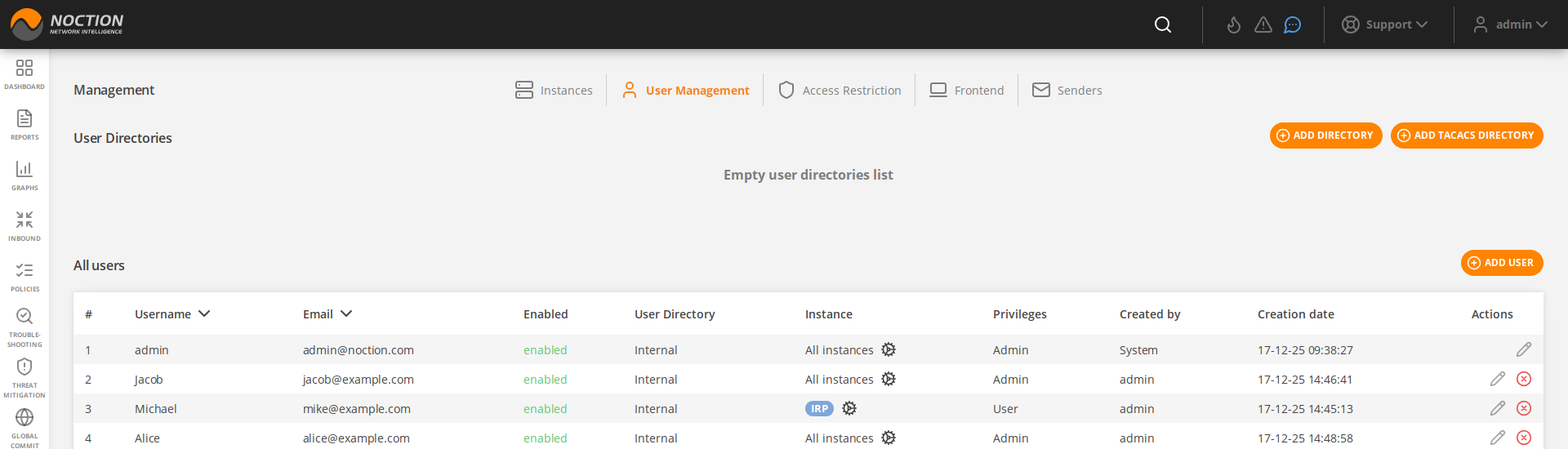
Figure 3.14.3: User Management
3.14.2.1 User token management #
Along with GMI tokens, the user tokens can also be added for each particular user. This serves as an additional security enhancement for users who would like to integrate IRP into their own monitoring systems or reporting tools.
User token generation can be performed only by the logged user for himself, however instance administrators are able to remove tokens for users who are inactive or should not have any tokens added.
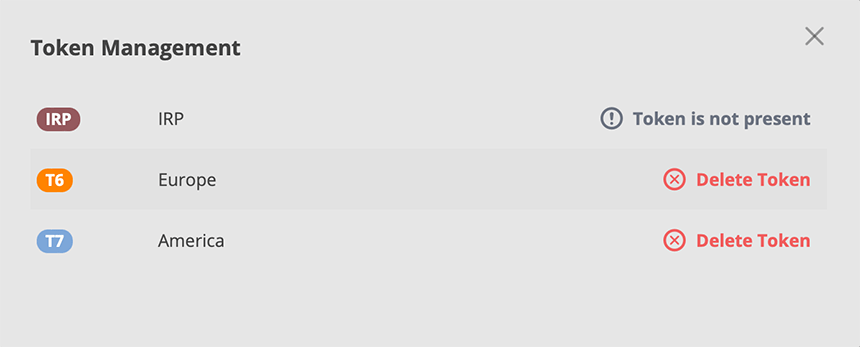
Figure 3.14.4: User token management
3.14.2.2 Internal user directory #
GMI includes an Internal user directory that allows multiple user accounts to be setup.
To add a new user, one should click the ADD USER button and fill out the corresponding fields in a popup window.
There are 3 user roles available in GMI, with specific limitations and privileges:
- User – cannot manage other users or instances
- Manager – cannot manage users
- Admin – full privileges

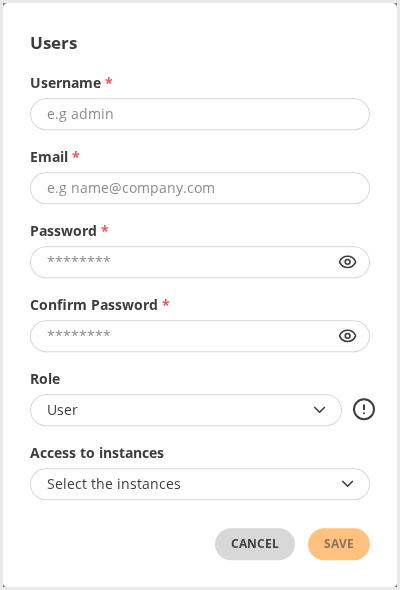
Figure 3.14.5: Adding users
3.14.2.3 LDAP and Active Directory #
LDAP or AD user directories can be added, updated and removed from GMI by accessing “Management → User Management” tab. Each user directory takes a series of parameters specific for the protocol.
 All operations with DNs (initial bind DN, group DNs, user names) are case insensitive and also strip redundant whitespace.
Refer individual protocol documentation for how to correctly configure one or another user directory.
The example below offers a generic set of parameters required to configure GMI to use Active Directory for access management.
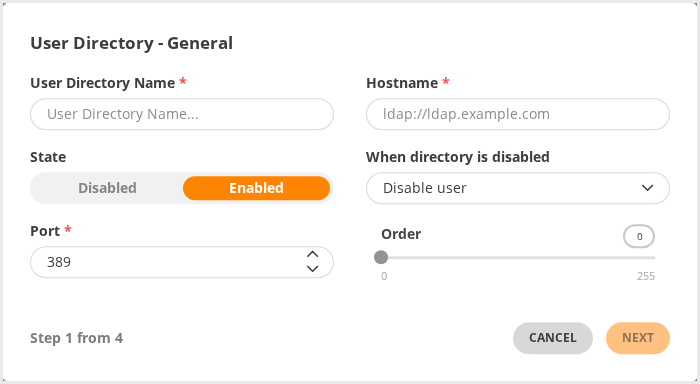
Figure 3.14.6: User Directory configuration
The general tab covers:
- User directory name – the name assigned to the directory within GMI,
- User directory hostname in the form of either IP address or domain name (LDAP/LDAPS),
- Enabling or disabling a user directory,
- The option to disable or remove users completely for a disabled directory.
- User directory port
- Order specifies when this user directory will be examined by GMI compared to other user directories
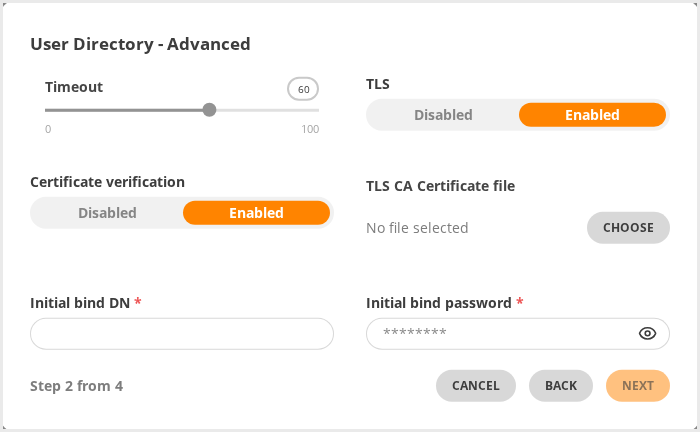
Figure 3.14.7: User Directory Advanced Options
Advanced configuration of a user directory covers:
- Timeout before failing a connection to this user directory
- TLS use
- Certificate verification
- CA certificate used to verify server’s certificate in case the Certificate verifications is turned on
- Initial binding user name that GMI uses to authenticate itself
- Initial bind password assigned to GMI.
 Usually bind passwords are not required to access directories. If a password is required and configured via GMI Frontend, it will be scrambled in GMI configuration files. If the password is specified directly in GMI configuration it is provided in clear-text with the condition that it does not start/end with scrambled password encapsulation characters.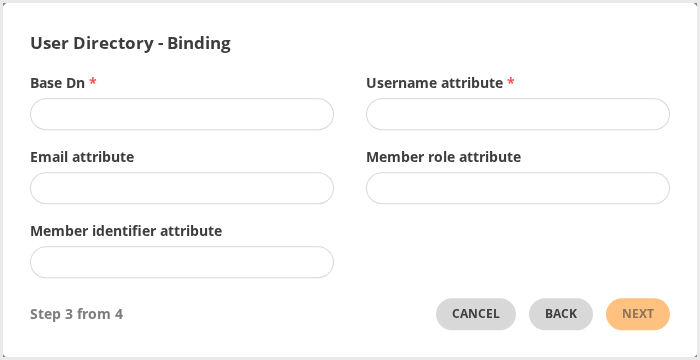
Figure 3.14.8: User Directory Bindings
Bindings maps User Directory attributes to GMI specific attributes, for example:
- Base DN specifies the root distinguished name and user subtree
GMI recognizes BOTH short and full user identifiers. Examples below are both valid directory entries that will match user “chris” with long name “Mr. Chris Smith”:
cn: ops
uniqueMember: chris
and
cn: ops
uniqueMember: cn=Mr. Chris Smith,ou=employees,ou=People,dc=ops,dc=org
- Username and Email fields map User Directory attributes to GMI user attributes
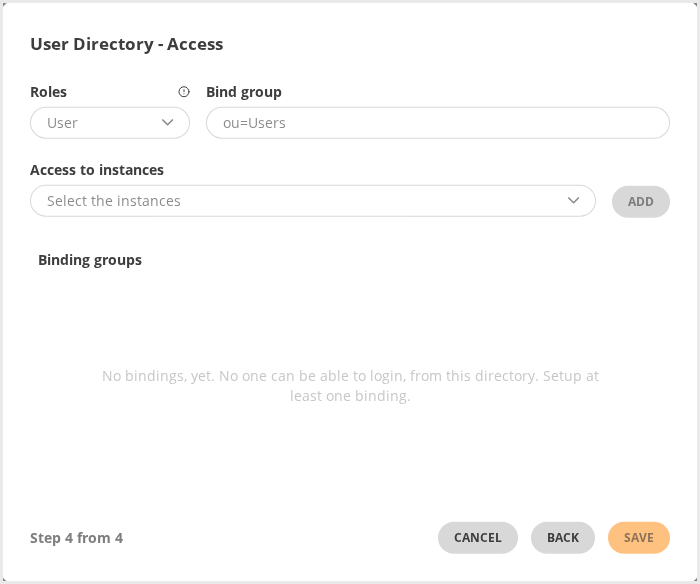
Figure 3.14.9: User Directory Access Options
Access configuration of a user directory covers:
- Roles assigned (either User, Manager or Admin),
- Bind group – the name of the attribute that uniquely identifies a given group or user.
Do NOT provide the Distinguished Name – the name that includes an object’s entire path to the root of the LDAP namespace. Introduce the Relative Distinguished Name instead – an object name without a path, or a partial path (Example: “cn=support”).- Access to IRP instances available in GMI. (Users with the Admin roles have access to all IRP instances)
3.14.2.4 OIDC User Authorization #
GMI supports authentication through OpenID Connect (OIDC) identity providers. OIDC providers can be configured by accessing Management → User Management → Identity Providers.
Each provider represents an external identity service responsible for authenticating users before granting access to GMI. The information required during configuration depends on the selected OIDC implementation.
Refer to the documentation of your identity provider for the exact endpoint URLs and client credentials required for the integration.
The example below demonstrates the basic steps required to configure an OIDC identity provider.
Configure OIDC Identity Provider tab includes:
- Name – the display name used to identify the provider.
- Client ID – the identifier assigned to the application by the identity provider.
- Client Secret – the secret associated with the registered client.
- State – enables or disables the provider.

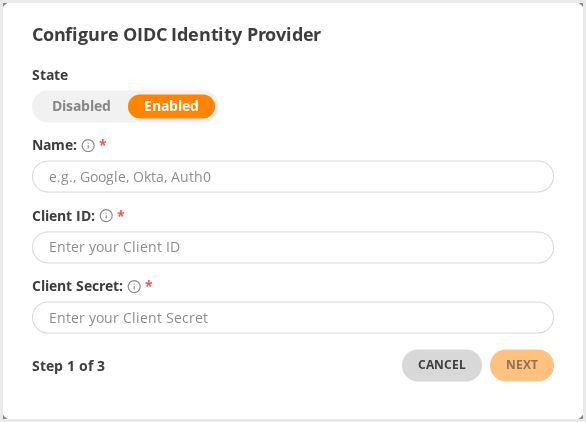
Figure 3.14.10: OIDC Provider configuration
Configure URLs tab defines the endpoints used during the authentication process:
- Issuer URL – identifies the OIDC issuer.
- Authorization URL – initiates the user authentication flow.
- Token URL – exchanges the authorization code for authentication tokens.
- User Info URL – retrieves user profile information after successful authentication.
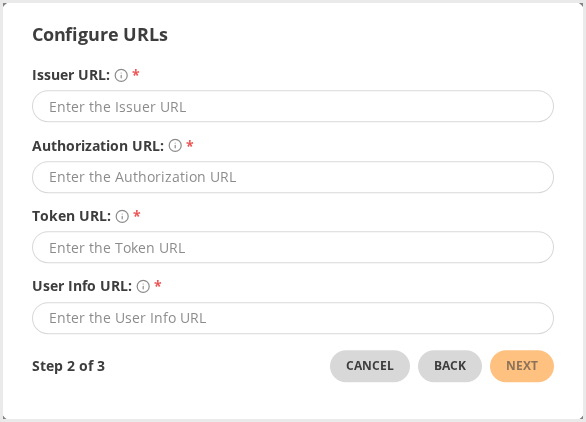
Figure 3.14.11: OIDC URLs configuration
Callback Preview tab includes:
- Callback URL – generated automatically by GMI and used as the redirect URI after authentication. This URL must be registered in the identity provider configuration before users can sign in successfully. If the generated hostname is incorrect, update the hostname in the gmi.yaml configuration file.

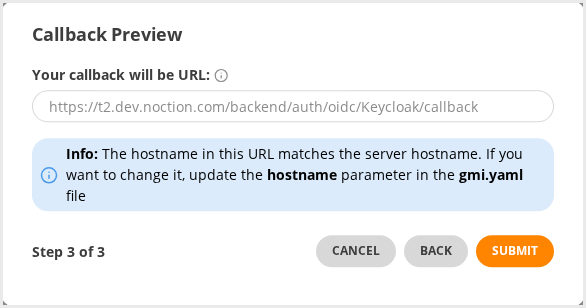
Figure 3.14.12: OIDC URLs configuration
After saving the configuration, the provider becomes available as an authentication option on the GMI login page.
To authenticate through an OIDC provider, a corresponding internal user account must already exist in GMI.
User association is performed by comparing the email address received from the identity provider with the email configured for the internal GMI account. If both values match, GMI automatically links the external identity to the existing user during the first successful authentication.
The login procedure is as follows:
- The user selects the configured OIDC provider on the GMI login page.
- GMI redirects the user to the external identity provider.
- After successful authentication, the user is returned to GMI through the configured callback URL.
- If a matching internal account is found, access is granted without any additional user configuration.
The Users table displays the authentication source in the Directory column. When multiple identity providers are linked to the same internal account, the number of associated providers is shown accordingly.