
Noction Flow Analyzer (NFA) uses ClickHouse to store and analyze traffic information collected from NetFlow, sFlow, IPFIX, J-Flow, and NetStream exporters. In a typical installation, the ClickHouse database runs on the same server as NFA. This arrangement keeps deployment and administration relatively simple, and it works well when the server has enough resources for incoming data, historical storage, and analytical queries.
Larger monitoring environments can have different requirements. A growing number of exporters, longer retention periods, or more demanding reports may put increasing pressure on the database server. Some operators also want a second copy of their stored traffic data so that an individual storage-node failure doesn’t leave the dataset inaccessible.
NFA’s sharding-enabled ClickHouse architecture addresses these requirements by supporting multiple database shards and replicas. The implementation retains a single-node default configuration. Additional ClickHouse servers can be introduced when storage capacity or redundancy becomes a concern, without requiring a complete NFA application installation on every database node. The architecture covers both flow data and BGP routing information. Each uses a sharding key based on its own record attributes, while the underlying distributed storage and replication mechanisms remain the same.
Starting with the existing NFA database structure
NFA uses MySQL for application information and ClickHouse for network traffic data and analytical storage. The ClickHouse database contains flow and BGP tables, including aggregated datasets used by NFA’s reporting and analysis functions.
The new sharding architecture extends the ClickHouse part of the installation. It doesn’t change the basic role of the flow collector, which receives and processes exports before the resulting data reaches storage. This matters when considering capacity. If ClickHouse is the limiting component, distributing storage and query workloads may help. If the collector is unable to process incoming exports, adding database shards won’t necessarily address that problem.
The NFA components documentation describes the collection component and supported export formats. BGP data follows a different path into NFA. When the optional BGP Data capability is configured, NFA establishes BGP sessions with network devices, obtains routing information, and makes it available for routing analysis and correlation with traffic data.
The storage architecture needs to accommodate both datasets, even though their contents and sharding keys differ.
A cluster with only one database server?
A fresh NFA installation using the sharding-enabled architecture creates a ClickHouse cluster called nfa. Initially, that cluster contains one shard with one replica. The database server is local, just as in a conventional single-node deployment. The installation also sets up ClickHouse Keeper, the cluster definition, and the identifiers used by replicated tables.
At first, this may seem unnecessary. Why configure a cluster when there’s only one database instance? The reason is that the same database structure can be used when additional nodes are introduced. NFA doesn’t need to begin with a separate non-clustered design that must later be replaced. Distributed tables, replicated storage engines, and the required coordination paths are already part of the installation.
For operators who don’t need multiple database servers, the deployment remains straightforward. A single-node NFA installation doesn’t require extra database hardware.
The role of ClickHouse Keeper
ClickHouse Keeper coordinates replication and certain distributed database operations. The default NFA installation runs Keeper locally alongside ClickHouse Server. The database service is configured to depend on Keeper and start after it. Keeper stores coordination information rather than the flow or BGP dataset itself.
The default installation has only one replica, so there isn’t another physical copy of the data to synchronize. Nevertheless, the replicated tables are registered through Keeper and can subsequently be extended with additional replicas. It’s worth distinguishing the presence of a replicated table engine from having redundant storage. One shard with one replica still contains only one physical database copy.
How NFA assigns data to shards
NFA uses the ClickHouse Distributed table engine to distribute both flow and BGP data across the available database shards. The two datasets have different structures, so NFA uses a separate sharding key for each.
For flow data, the key combines exporter information with source and destination addresses. For BGP data, it combines the BGP session address with the network prefix. In both cases, ClickHouse calculates a hash from the selected attributes and uses the resulting value to choose a destination shard. The Distributed tables also provide a logical interface through which the stored datasets can be queried across the configured cluster.
Sharding Flow Data
NFA contains local storage tables such as flows_data1, along with corresponding Distributed tables such as flows_data1_dist. The Distributed table references the nfa cluster and the underlying local storage table. When data is inserted, it uses the following sharding expression:
cityHash64(
    exporter_address,
    exporter_id,
    src_address,
    dst_address
)
The expression combines four attributes:
exporter_address— the address associated with the exporter.exporter_id— the exporter identifier.src_address— the source IP address.dst_address— the destination IP address.
ClickHouse calculates a hash from these values and maps it to one of the available shards according to the cluster configuration.
Why include source and destination addresses?
Consider a provider collecting flow records from several routers. One possible way to distribute the database would be to assign each router to a specific shard. That works when the exporters generate reasonably similar amounts of data. In practice, they may not. A few busy edge or core routers could account for most incoming records, while many other devices export much smaller volumes. If all records from one busy router were assigned to the same shard, that server could end up handling a disproportionate amount of the workload.
NFA’s sharding key includes source and destination addresses alongside the exporter information. Consequently, different address combinations observed by the same exporter can be assigned to different shards. That gives ClickHouse more opportunities to distribute the incoming data than an exporter-only key would provide. The actual balance still depends on the traffic. A hash function doesn’t guarantee identical row counts or resource utilization across shards.
What the flow sharding key doesn’t include
The selected fields also tell us something about how the records are grouped for placement. The key doesn’t include transport ports or IP protocol. Records with the same exporter context and source-destination address pair therefore produce the same hash, even if they represent different TCP or UDP conversations. The key should not be confused with a conventional five-tuple flow identifier.
Another detail is that shard placement depends on the configured cluster topology. If the number or weighting of shards changes, future inserts may be routed differently. This doesn’t automatically move records that have already been stored.
Sharding BGP Data
NFA’s distributed database architecture is not limited to IP flow information. It also covers BGP routing data. The optional BGP Data addon allows NFA to obtain routing information through BGP sessions with connected routers. This information is used to examine prefix advertisements and withdrawals, analyze routing changes, and associate BGP attributes such as AS_PATH with traffic records.
For example, an engineer can investigate when a prefix was advertised or withdrawn, review routing changes over a selected time period, or examine traffic associated with particular AS paths. These operations involve routing information rather than the traffic records received through NetFlow, sFlow, or IPFIX. Accordingly, NFA uses a different sharding key for BGP records:
cityHash64(session, prefix)
Here, session is the address of the BGP session from which the routing information was obtained, and prefix identifies the network prefix associated with the record. ClickHouse calculates a hash from the combination of these two values. The resulting number is then mapped to one of the available shards in the nfa cluster.
The corresponding Distributed table definition is:
ENGINE = Distributed(
    nfa,
    currentDatabase(),
    bgp,
    cityHash64(session, prefix)
);
This means BGP records associated with the same session and prefix produce the same sharding-key value.
Under an unchanged cluster configuration, these records are assigned to the same shard. This applies to records involving the same session and prefix, whether they represent an advertisement or a withdrawal. For instance, if a BGP session reports an announcement for 203.0.113.0/24 and later reports a withdrawal for that prefix, the two records have the same session and prefix values. They therefore produce the same hash and are mapped to the same shard, provided the sharding configuration has not changed.
Including the prefix in the key also means that records from one BGP session are not necessarily confined to a single shard. Updates concerning different prefixes can be distributed across multiple storage nodes. Conversely, information about the same prefix received through different BGP sessions may be assigned to different shards.
This is particularly relevant in environments where NFA receives routing information from several routers or BGP sessions. As with flow data, the distribution depends on the actual records. The hash does not guarantee that every shard will receive an equal number of BGP updates. The local BGP storage table uses ClickHouse’s ReplicatedMergeTree engine. If a shard has more than one replica, ClickHouse synchronizes the BGP data between those replicas using the same underlying replication mechanism as the flow tables.
How distributed storage works in NFA
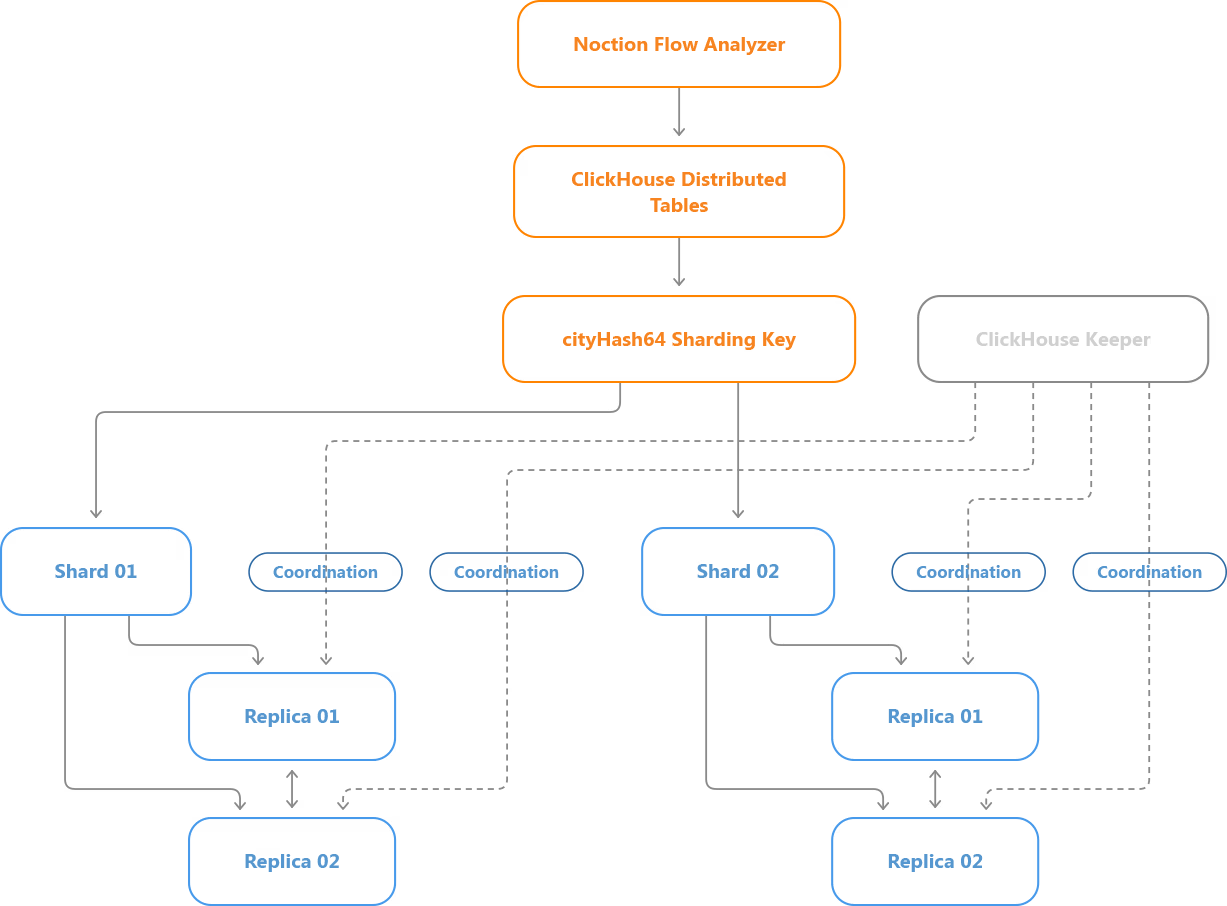
The following diagram shows a two-shard deployment with two replicas per shard. Flow and BGP records enter their corresponding Distributed tables. Each table calculates its sharding key and selects a destination shard. Within that shard, the replicated storage engine maintains the data on the configured replicas.
Queries across multiple shards
Once NFA has more than one shard, traffic and BGP information may be stored on several ClickHouse servers. A report covering the entire network may need data from all of them. The Distributed tables provide access to the cluster as a logical dataset. ClickHouse executes the necessary work on the relevant shards and combines the results.
For example, an operator investigating traffic by destination IP address over a given interval doesn’t have to manually retrieve a separate report from each storage server. Similarly, routing information about a prefix may need to be retrieved from different shards when it was observed through different BGP sessions. The database handles the distributed execution.
There is a configuration detail associated with NFA’s multi-shard queries. Some NFA queries use IN or JOIN subqueries involving distributed tables. ClickHouse normally restricts certain double-distributed query patterns through its distributed_product_mode setting.
The NFA multi-shard configuration uses:
distributed_product_mode = global
This allows the relevant distributed IN and JOIN operations to use global query execution semantics. The setting must be applied consistently across the ClickHouse nodes in the documented multi-shard configuration. It’s an implementation requirement rather than something an NFA user would normally interact with through the reporting interface.
As with any distributed database, query performance depends on the amount of data involved, the available resources, and communication between servers. Distributing a query across several shards can be useful for large analytical workloads, but not every query becomes faster simply because more nodes are available.
How replication is handled
Sharding determines where different portions of the dataset are stored. Replication maintains copies of the data belonging to a particular shard. NFA uses replicated versions of ClickHouse’s MergeTree engines for its main stored flow and BGP tables.
| NFA table | ClickHouse storage engine |
|---|---|
| bgp | ReplicatedMergeTree |
| flows_data1 | ReplicatedAggregatingMergeTree |
| flows_data2 | ReplicatedAggregatingMergeTree |
| flows_data3 | ReplicatedAggregatingMergeTree |
| flows_data_1s_compact | ReplicatedAggregatingMergeTree |
The AggregatingMergeTree family supports aggregation-oriented storage. Its replicated variant adds the ability to maintain corresponding data on multiple replicas of the same shard.
What happens after an insert?
NFA’s cluster configuration uses internal_replication=true.
When a block of data is inserted through a Distributed table, ClickHouse selects the destination shard and sends the block to one replica of that shard. The replicated table engine then handles synchronization with the other replicas.
For example, suppose Shard 01 contains two replicas. A new block is inserted into one of them. ClickHouse coordinates the replication operation so that the other replica can obtain the necessary data parts. The two replicas eventually maintain the same logical dataset, although synchronization may take time if a replica is unavailable or has a backlog to process. This behavior is handled by ClickHouse rather than by having the NFA application independently insert every record into every replica. The same principle applies to replicated flow and BGP tables.
How Keeper identifies replicas
Replicated tables use a coordination path that contains the shard identifier and table name.
For example, the flows_data1 table in Shard 01 uses:
/clickhouse/tables/01/nfa/flows_data1
The BGP table in the same shard uses:
/clickhouse/tables/01/nfa/bgp
If another replica is added to Shard 01, it shares the corresponding table paths but registers under its own replica identifier.
A separate shard uses different paths:
/clickhouse/tables/02/nfa/flows_data1
/clickhouse/tables/02/nfa/bgp
This arrangement lets ClickHouse distinguish replicas containing the same data from shards responsible for different portions of the dataset. NFA’s ClickHouse configuration stores shard and replica identifiers as macros. Each node has its own values, which determine the corresponding Keeper paths. The ClickHouse documentation on replication covers the underlying database mechanism.
Which topology makes sense?
The architecture supports several configurations. The simplest is the default one-shard installation, while larger deployments can use multiple shards, multiple replicas, or both. The choice depends on whether an operator needs more database capacity, another copy of stored traffic and BGP data, or both.
One shard, one replica
This is the standard starting point. NFA and the ClickHouse database operate with one local storage instance. There’s no inter-node database traffic, and administration remains relatively simple. If the server has sufficient resources for the number of exporters, retained data, and query workload, there may be no reason to expand it. The limitation is that the shard has no additional database copy. If the only ClickHouse server fails, its stored data may be inaccessible until service is restored.
Two shards, one replica each
Now consider an NFA installation at a hosting provider whose database is approaching its storage limits. The operator adds another ClickHouse server as Shard 02. New flow and BGP records inserted through the Distributed tables can be assigned to either shard according to their respective sharding keys. Each database server stores a different portion of the relevant datasets. This provides additional storage and processing resources, but neither shard has a redundant copy. If one shard becomes unavailable, its portion of the data may be inaccessible.
An operational detail is particularly important here: the new shard doesn’t automatically receive half of the historical records. Existing data remains on the original shard unless a separate redistribution procedure is performed. The two servers may therefore have considerably different disk utilization immediately after expansion.
One shard, two replicas
Suppose database capacity isn’t the main concern. The operator instead wants another copy of stored traffic and routing information. A second ClickHouse server can be added as Replica 02 of the existing shard. Unlike a new shard, this server doesn’t receive a different subset of future records. It joins the existing shard and synchronizes its data.
Once the synchronization process is complete, both replicas maintain the same logical dataset, including the replicated flow and BGP tables. The arrangement can help preserve access to stored data during certain database-node failures or maintenance operations. It doesn’t increase the amount of unique historical information that the shard can store.
Two shards, two replicas each
A larger NFA installation may require both distributed storage and database redundancy. In this configuration, the cluster contains four ClickHouse instances. Shard 01 has two replicas, and Shard 02 has two replicas. The shards store different portions of the datasets, while the replicas within each shard maintain the same logical information.
This combines the capacity benefits of sharding with the redundancy provided by replication. There is more infrastructure to maintain, and the configuration requires sufficient network, storage, and processing resources for both distributed queries and replication. It also doesn’t eliminate every possible failure. Losing both replicas of one shard can make that shard’s data unavailable, and shared dependencies still need to be considered.
What changes when an existing NFA installation is upgraded?
For an existing NFA installation, introducing sharding support involves more than creating a cluster definition. The database already contains historical information in local ClickHouse tables. The upgrade has to convert those tables to replicated engines while preserving the stored data. NFA’s documented upgrade procedure handles this migration as part of preparing the installation for the cluster-based architecture.
Preparing ClickHouse
The upgrade first prepares the database services. ClickHouse Keeper is started and checked for availability. ClickHouse Server is then prepared and verified before the schema migration proceeds. If database preparation fails, the schema upgrade is not supposed to continue. The package upgrade also stops NFA services that could write to the affected tables. This prevents new records from being inserted while the existing storage structures are being migrated.
Converting the tables
The existing BGP table is migrated from MergeTree to ReplicatedMergeTree.
The main aggregated flow tables are migrated from AggregatingMergeTree to ReplicatedAggregatingMergeTree.
NFA’s migration process creates temporary replicated tables using the intended final Keeper paths. It then attaches the partitions from the existing tables before replacing the original table objects. When the source and destination use the same ClickHouse storage, attaching partitions can reuse existing data parts rather than requiring every row to be copied through a new logical insert. This matters for installations with substantial historical datasets.
After migration, the data remains available through the new table structure. The upgrade also creates the distributed tables needed for sharding.
The installation remains on one server
The upgrade doesn’t automatically create additional ClickHouse instances. The existing server becomes Shard 01, Replica 01 of the nfa cluster.
Historical data stays on that server. Operators who don’t need a distributed database can continue using the single-node configuration. Additional shards or replicas can be introduced later, when capacity or availability requirements justify them.
Adding a database node
An additional ClickHouse server doesn’t need a separate installation of the NFA application. It does need a compatible ClickHouse version and the correct cluster configuration. The nodes must be able to resolve one another’s configured hostnames, establish the required database connections, and communicate with Keeper. Each node also needs the appropriate shard and replica identifiers. These identifiers determine whether the node represents a new shard or another copy of an existing one.
Adding a shard
A new shard receives its own shard identifier and becomes an independent storage partition within the cluster. Once the cluster configuration is updated and the required NFA schema is initialized, the shard can begin receiving new distributed inserts.
Schema initialization is coordinated from the original NFA node through the nfaadm administration utility. The additional ClickHouse server runs the database services, not another full NFA application instance.
Historical data redistribution is a separate consideration. Simply adding the shard doesn’t move existing partitions from the original server.
Adding a Replica
A new replica uses the shard identifier of the existing shard and receives a different replica identifier. After the replicated tables are initialized, ClickHouse can synchronize the data belonging to that shard onto the new server. The time and resources required depend on the amount of data and the available network and storage performance. A replica with a large synchronization backlog may need considerable time to catch up. It should not be assumed to be fully synchronized immediately after appearing in the cluster configuration.
The documented NFA setup includes checks to confirm that the expected replicas become active and their replication queues return to normal.
Monitoring a multi-node NFA database
With several database nodes, monitoring the health of the NFA frontend and collector isn’t enough. Administrators also need to verify that the ClickHouse servers can communicate, that distributed queries execute correctly, and that replicas remain synchronized.
ClickHouse provides system tables for these checks.
system.clusters reports the configured cluster topology, including shards, replicas, and their host information.
system.replicas provides information about replicated tables, including active replica counts, replication queues, delay, and read-only status.
For a healthy replicated shard, the expected replicas should be active, and synchronization backlogs should clear after pending work is processed. The database can also be queried across all configured replicas to compare stored data and check whether new inserts are reaching the intended shards.
Exact physical part counts don’t always match between replicas at every moment. ClickHouse performs background merge operations, and replicas can temporarily have different part layouts while representing the same logical data. Administrators should therefore pay attention to replica health and logical data consistency rather than relying on a single physical row or part-count comparison.
Keeper availability
The documented NFA configuration runs ClickHouse Keeper on the NFA node. Additional ClickHouse servers connect to that Keeper instance. This is an important aspect of the availability design. Even if the database has several replicas, they still depend on the configured coordination service for replication-related operations. A loss of Keeper connectivity can cause replicated tables to become read-only or affect other operations requiring coordination.
Organizations planning a more fault-tolerant deployment should evaluate Keeper availability alongside the database servers. Database replication alone shouldn’t be treated as complete high availability for the NFA installation.
What operators should expect from the new architecture
The main benefit of sharding is the ability to distribute ClickHouse storage and analytical workloads across additional servers. For an installation facing storage capacity limits, this offers an alternative to continually increasing the resources of a single machine. Replication addresses another requirement: keeping additional copies of a shard’s stored information. That can be useful when an individual database server fails or needs maintenance, provided the remaining replica and supporting services are operational. These capabilities apply to both flow and BGP data. NFA uses the attributes appropriate to each dataset to determine shard placement and uses replicated storage engines to maintain the corresponding data copies.
Neither mechanism changes the fundamental requirements of flow collection. The NFA collector still needs sufficient capacity to receive and process incoming NetFlow, sFlow, or IPFIX exports. Database expansion doesn’t automatically add collector instances or prevent losses occurring before records reach storage. Replication also doesn’t replace backups. Unwanted changes can propagate between replicas, so independent recovery copies remain relevant. Finally, a larger cluster needs more operational attention. Inter-node connectivity, authentication, storage utilization, replica synchronization, and coordination services all become part of the monitoring infrastructure. These aren’t reasons to avoid distributed storage. They’re factors to consider when deciding whether the additional capacity or redundancy is justified.
Scaling NFA as your requirements grow
NFA’s sharding and replication architecture allows operators to expand ClickHouse storage as their requirements change. Additional shards can distribute growing flow and BGP datasets and database workloads, while replicas provide redundant copies of stored data.
The default single-node configuration remains suitable for deployments with sufficient resources. Existing installations can also be upgraded to the cluster-aware architecture while preserving historical data, with additional nodes introduced when needed.